
Widgetable: Besties & Couples
Happeny Technology Pte. Ltd.Social
4.712.55K Reviews
- Version
- 4.2.040
- Installs
- 50.00M
- Age Rating
- Everyone
Screenshots

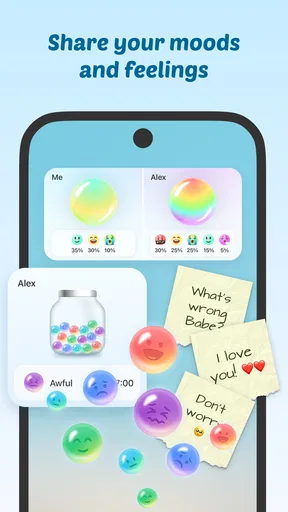
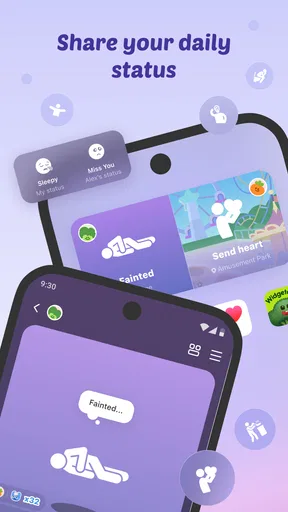
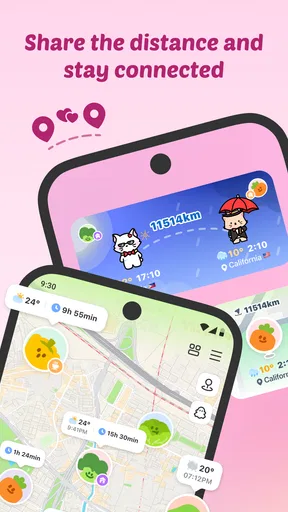
Our Review of Widgetable: Besties & Couples
 Analysis by Appyee
Widgetable: Besties & Couples caught my attention because it turns a social connection into something visible throughout the day. Instead of asking me to open a chat and start a conversation, it places shared updates and small signs of attention closer to the home screen. That sounds simple, but it changes the rhythm of using a phone: the app works best when both people treat it as a tiny shared routine rather than another messaging service.
After spending time with it, my view is positive but selective. It is a free social app from Happeny Technology Pte. Ltd., aimed at friends, couples, and other close relationships. Its central appeal is emotional presence: sharing things such as pet care, sleep, bodily updates, and moods can make someone feel included even when neither person has time for a full conversation. The important question, though, is whether that feeling survives the first week. In my experience, it can, but only if you choose a small number of habits and avoid turning every feature into an obligation.
What makes the first week feel special
The first few days are the strongest part of the experience. Setting up a shared connection and seeing information appear in a widget gives the app an immediate sense of closeness. A normal chat waits for me to open it, read messages, and respond. Widgetable is more passive and more personal: the relationship can remain present while I am checking the weather, planning my day, or unlocking my phone for an unrelated task.
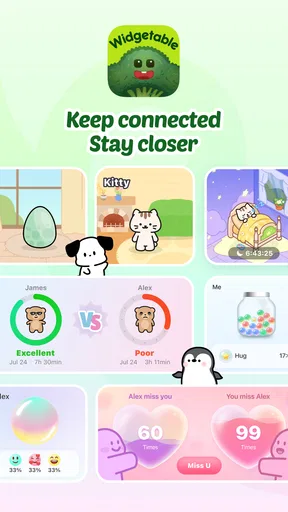
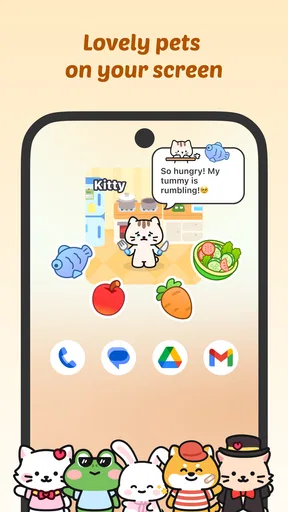
The pet-focused side is particularly easy to understand. Caring for a virtual pet together creates a shared object that is lighter than a serious relationship app and more involving than simply exchanging emojis. It gives two people a reason to return without requiring a long discussion. For a couple living apart, or friends who have different schedules, that small shared responsibility can become a pleasant checkpoint.
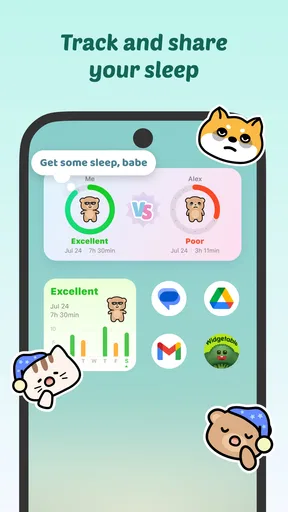
The same principle applies to sleep and mood sharing. These updates are not replacements for honest conversation, but they can provide useful context. If I know that a friend slept badly or is having a low-energy day, I may choose a gentler message instead of assuming they are ignoring me. That is a subtle benefit, and it is one of the more convincing reasons to keep the app installed.
Widgets are the key to that effect. They make the app feel less like a destination and more like part of the relationship’s background. The best use of Widgetable is not constant interaction; it is low-effort awareness that quietly reduces distance. When the updates are relevant and welcome, the home screen becomes a small reminder of another person rather than just another grid of icons.
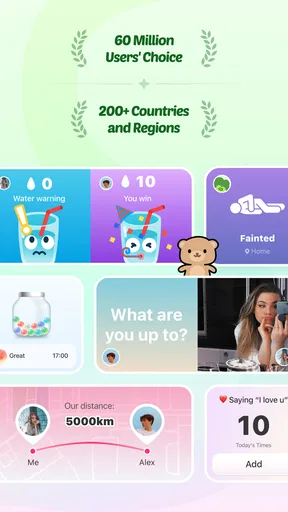
There is also a playful quality to sharing moods and everyday details. People who dislike long messages may find it easier to communicate through a quick status or a simple update. That can help relationships where both people care about staying connected but do not naturally send frequent texts. I would especially recommend trying it with someone who enjoys visual, lightweight communication more than formal check-ins.
Still, the novelty is powerful in the beginning. New widgets, a shared pet, and the feeling of discovering the app together can make nearly any routine seem exciting. I would not judge its long-term value during the first evening. The more useful test is whether the two of you still use the same features after the initial setup has stopped feeling new.
A realistic everyday routine
Imagine two partners who work different shifts. One wakes up while the other is still asleep, checks the shared sleep information, and sees a mood update before starting work. Later, a quick pet-care action keeps their shared activity alive without interrupting either schedule. In the evening, the updates provide an easy opening for conversation: “You looked tired today—are you okay?” That is more natural than sending a forced “How was your day?” message when both people are busy.
For friends, the routine can be even less demanding. A pair of university friends might use the mood feature during exam periods and keep a shared pet for a bit of fun. They do not need to exchange updates every hour. The app remains useful when it makes contact easier, not when it becomes a second timetable to manage.
Whether it still earns attention after the novelty
The long-term value depends on how well the app fits an existing relationship. Widgetable is not likely to create closeness between people who rarely want to communicate. It can amplify an active friendship or partnership, but it cannot supply trust, conversation, or genuine interest by itself. That distinction matters because the app’s design can make connection feel effortless, while meaningful relationships still require effort elsewhere.
For the right pair, recurring value comes from continuity. A shared pet can act as a small ongoing project. Mood and sleep updates can become a gentle way to notice changes in someone’s routine. Widgets keep those signals visible without requiring a separate session. These are modest benefits, but modest benefits are exactly what can last when they do not demand much time.
I found the app more sustainable when treating it as a menu rather than a checklist. You do not need to use every available sharing option. One person may care about sleep, while another prefers moods or pet interaction. Choosing the features that feel natural prevents the relationship from becoming a series of notifications and expectations. My practical advice is to begin with one shared habit, then add another only if both people actually miss it when it is gone.
This approach also answers a common concern: does both people need to be equally active? Ideally, yes, but not constantly. The app can still be enjoyable when one person checks in more often, provided the difference does not create resentment. If one partner feels responsible for keeping every shared element alive, the playful system can quickly become work. Discussing expectations early is more valuable than trying to maximize activity.
Widgetable is also a better match for close one-to-one relationships than for broad social circles. Its strongest moments come from personal context, not from collecting a large audience. If I wanted public posting, group discussion, or a conventional feed, I would choose a mainstream social network instead. This app is more intimate and deliberately narrower.
Maintenance is light, but not invisible
The app does not demand the same kind of maintenance as a full productivity tool, yet it still benefits from regular attention. Shared pets and recurring updates work because someone remembers to interact with them. If both users stop checking in, the home-screen presence can turn from comforting to irrelevant. The danger is not a complicated setup; it is gradual neglect.
I recommend deciding what “active enough” means before installing it together. That might be a morning sleep check, an occasional mood update, or a quick pet interaction when convenient. Without that informal agreement, one person may interpret silence as a technical problem or a lack of care. The app can make small gaps more visible, which is helpful only when the relationship already has clear communication.
Widgets also need sensible placement. If the home screen becomes crowded, the shared information loses its special quality and starts competing with everything else. I would use the smallest or least intrusive arrangement that still feels useful. The point is to notice the other person naturally, not to make the phone feel like a dashboard of duties.
Another practical consideration is emotional privacy. Sharing sleep, mood, or personal bodily updates can be intimate even when the app presents them playfully. I would only enable the categories both people genuinely want to share. Someone may enjoy a virtual pet but feel uncomfortable exposing daily moods, and that boundary should be respected. The app is most successful when it supports voluntary closeness rather than automatic disclosure.
Because Widgetable is a social app, the quality of the experience depends on the other person’s participation and on how comfortable both users are with its sharing style. It is not the ideal choice for someone who wants a completely private journal, a serious health tracker, or a robust task-management system. Its updates are relationship signals, not professional records.
Where fatigue begins
The first source of fatigue is repetition. A shared pet can be charming, but any repeated action may eventually feel routine. Sleep and mood updates can also lose their impact when they become automatic taps rather than meaningful signals. That does not make the features bad; it means they need occasional variation or a break. A habit that is supposed to create warmth should not become another daily streak to protect.
The second issue is expectation. When an app puts a partner’s mood or activity close to the home screen, it may encourage over-reading. A missed update could simply mean a busy day, a forgotten phone, or a change in routine. If someone treats every absence as a message, the tool becomes a source of anxiety. I would recommend using it as a prompt for care, never as evidence in an argument.
There is also a commercial layer to consider. The app is free to start, while optional in-app purchases range from $0.99 to $99.99 per item. That broad range makes it important to decide what you actually need before spending. The core appeal is the shared experience, not the pressure to collect every decorative or additional element. I would keep purchases firmly optional and avoid letting customization become the measure of how much effort either person is making.
Some users may also find the combination of many relationship-oriented features slightly unfocused. A person looking only for a simple widget might consider the pet and mood systems unnecessary. Someone seeking a complete couple-planning platform may find it too playful. Its identity sits between a messaging companion, a virtual-pet experience, and a widget utility. That blend is exactly why it feels distinctive, but it also means it will not satisfy every social need.
Age suitability is broad, with an Everyone content rating, but that should not be confused with universal emotional fit. The app may be technically approachable for a wide audience, yet sharing personal moods or bodily information still requires maturity and consent. Parents and younger users should think about what they are comfortable sharing with another person before adopting those features as habits.
How it compares with familiar alternatives
Compared with ordinary messaging apps, Widgetable is less flexible for detailed conversation but better at passive presence. A chat app is the obvious choice when I need to explain something, send files, organize a group, or search through a conversation. Widgetable wins when the goal is to make a relationship visible without composing another message.
Compared with public social networks, it feels more private in spirit because the experience is built around close connections rather than an audience. That can reduce the pressure to perform. On the other hand, public networks offer a much broader stream of content and more opportunities to discover communities. I would not replace those services with this app; I would use Widgetable for a different, more personal purpose.
Compared with standalone virtual-pet apps, its advantage is the social context. The pet is not only something I care for alone; it can become a shared activity. A dedicated pet app may offer a deeper solo experience, though, so users who mainly want customization, progression, or a rich individual game should look elsewhere. Here, the pet matters because of who is on the other side.
Compared with dedicated sleep or mood trackers, Widgetable is intentionally lighter. It can help a partner notice a pattern or start a conversation, but I would not use it as a substitute for detailed personal tracking. Its strength is communication, not analysis. That distinction keeps expectations realistic and prevents disappointment.
Who should install it—and who should skip it
I think it is a good fit for couples living apart, best friends with busy schedules, and people who enjoy small shared rituals. It is especially appealing if you like widgets, visual updates, and playful forms of communication. Someone who often thinks, “I want to check in, but I do not have time for a whole conversation,” may find the format genuinely useful.
I would be more cautious if you dislike notifications, feel pressured by daily routines, or prefer relationships to stay entirely outside apps. It is also a poor match for someone searching for a serious health tool, a private diary, or a large community platform. The app’s value is narrow but real: it helps two close people maintain a visible thread of everyday connection.
Before committing to it, I would ask the other person three practical questions: which updates feel comfortable, how often do we realistically want to use them, and what happens when one of us is busy? Those answers matter more than adding every available feature. If the discussion feels easy, the app is likely to remain pleasant. If it immediately creates pressure, the home-screen convenience will not solve that problem.
My long-term verdict
Widgetable has earned a place on my recommended list, but not as an app everyone needs. Its first-week appeal is obvious, while its lasting value comes from restraint. The shared pet, sleep information, moods, and widgets can create a gentle sense of presence, especially for people who are separated by distance or schedules. The experience becomes weaker when users chase constant activity, overshare, or treat every update as a test of affection.
The app is free, works on Android from version 9 onward, and its current version is 4.1.061. Its broad reach is reflected in a 4.7 average from around 553 thousand ratings, with more than 50 million installs. Those figures suggest that the concept has connected with a large audience, but popularity does not remove the need to choose a routine that suits your relationship.
My final recommendation is to install it with one person you already trust, choose one or two features, and test whether they still feel natural after the excitement fades. If the app helps you notice each other without demanding constant replies, it can become a lovely background habit. If it starts measuring attention, creating guilt, or filling your phone with obligations, remove the features that cause friction—or move back to ordinary messaging. Widgetable works best when it adds warmth to an existing relationship, not when it is asked to carry the relationship on its own.
Privacy and Permissions
See what permissions an app requests and how it handles your data.
- Location
- approximate location (network-based), precise location (GPS and network-based)
- Phone
- read phone status and identity
- Photos/Media/Files
- read the contents of your USB storage, modify or delete the contents of your USB storage
- Storage
- read the contents of your USB storage, modify or delete the contents of your USB storage
- Camera
- take pictures and videos
- Microphone
- record audio
- Wi-Fi connection information
- view Wi-Fi connections
- Device ID & call information
- read phone status and identity
- Other
- view network connections, full network access, run at startup, set wallpaper, control vibration, prevent device from sleeping, install shortcuts, Google Play license check
Verdict
Strengths of Widgetable: Besties & Couples
- Fun widgets encourage daily interaction with friends or partners.
- Supports shared countdowns, reminders, and relationship milestones.
- Cute visual style makes home-screen personalization more enjoyable.
- Offers multiple widget types for different social connections.
- Simple interface is approachable for casual users.
Limitations of Widgetable: Besties & Couples
- Some features and customization options may require a subscription.
- Frequent notifications can feel distracting or overly demanding.
- Requires another person to get the most value from its features.
- Privacy concerns may arise from sharing location or personal updates.
- Widget performance can vary depending on device and battery settings.
Similar Picks in This Category
View All
Meta Platforms, Inc.4.6

Instagram4.0

Likee-Live, Chat & Party Games
Likeme Pte. Ltd.4.4

Facebook Lite
Meta Platforms, Inc.4.5

TikTok - Videos, Shop & LIVE
TikTok Pte. Ltd.4.0

Moj: Free Short Drama & Reels
ShareChat4.1
Frequently Asked Questions
What is Widgetable: Besties & Couples, and what can I do with it?
Widgetable: Besties & Couples is a social widget app designed for friends, couples, and close contacts. After installing it, you can connect with another person, place interactive widgets on your home screen, share moods or status updates, send messages, and use relationship-focused features such as shared pets, virtual plants, or activity indicators. The exact tools available may vary by device, region, and app version.
Does Widgetable require another person to use its main features?
Many of Widgetable’s most interesting features are designed for two or more connected users, so the experience is more useful when a friend, partner, or family member also installs the app. You may still be able to explore certain widgets and personalize your profile alone, but shared pets, relationship updates, and collaborative activities generally require an invitation or connection with another user.
Is Widgetable free to download and use?
Widgetable can generally be downloaded for free, but some features, virtual items, customization options, or premium content may require in-app purchases or a subscription. Before confirming a payment, review the price, billing frequency, and renewal terms shown in the app store. Availability of free features and premium plans can change through updates, promotions, or regional differences.
What permissions and personal information does Widgetable request?
Because Widgetable is a social and home-screen widget application, it may request information such as your account details, profile data, contacts or invitation links, notifications, and permission to display widgets. Some features may also involve photos, messages, activity information, or device-related data. Check the permission prompts and the app’s current privacy policy before sharing sensitive information or connecting with others.
Will Widgetable work on every Android or iPhone?
Widgetable’s compatibility depends on your phone model, operating system version, and the widget support available on your platform. Newer Android and iPhone devices usually provide the smoothest experience, while older phones may have limitations with notifications, background updates, battery usage, or interactive widgets. Check the Google Play Store or Apple App Store listing for the latest requirements before downloading.
